From the first sale to the branch report.

Explore the POS, stock, credit and accounts tools. Every screen below is from the real product with demonstration data.

Available now Set up during onboarding Planned

Available now

Point of sale that keeps up with the queue.

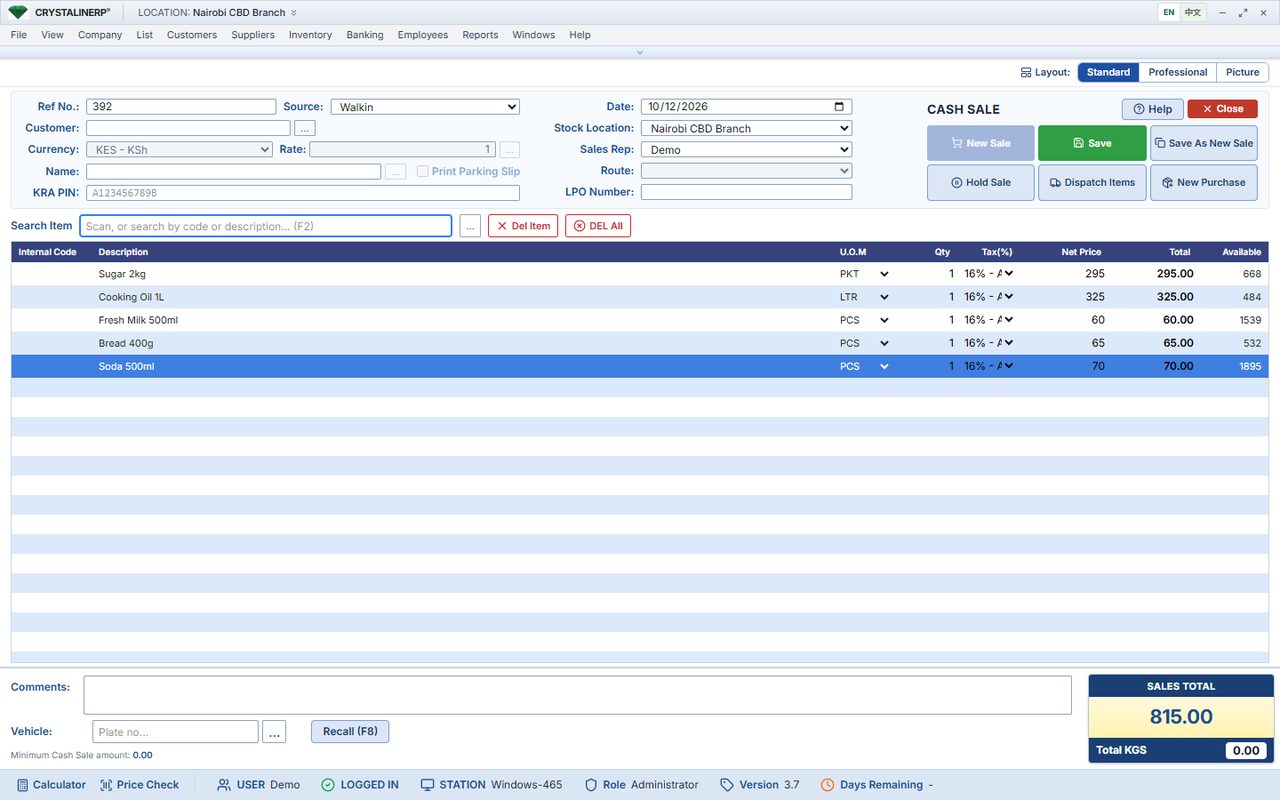
Choose keyboard, touch or picture layouts. Scan or search items, accept different payment methods and account for every cashier's takings.

  • Hold and recall sales; sales on account for approved customers
  • Split tenders: cash, M-Pesa, card, cheque, bank, vouchers, loyalty points
  • Receipts to 58 mm and 80 mm thermal printers; silent printing from the desktop till app
More pos features
  • Barcode scanners, cash drawer, customer display screen
  • Sell from an Android phone or handheld with a mobile printer
  • Z-report and cash-up per cashier and per till; pay-ins and pay-outs
Cash sale screen with scanned items, quantities, tax, totals and the Save, Hold Sale and Dispatch buttons View full screen
Standard cash sale layout. The touch and picture layouts use the same rules and postings.

Available now

Know what you have. Know what moved.

Check stock by location, trace every movement and use counts and reorder levels to stay in control.

  • Item list with quantity on hand, cost and prices; grouped by brand and category
  • Batches and expiry dates, serial numbers, barcodes per pack size
  • Stock-taking sheets with count entry and variance summary; stock adjustments with reasons
More stock features
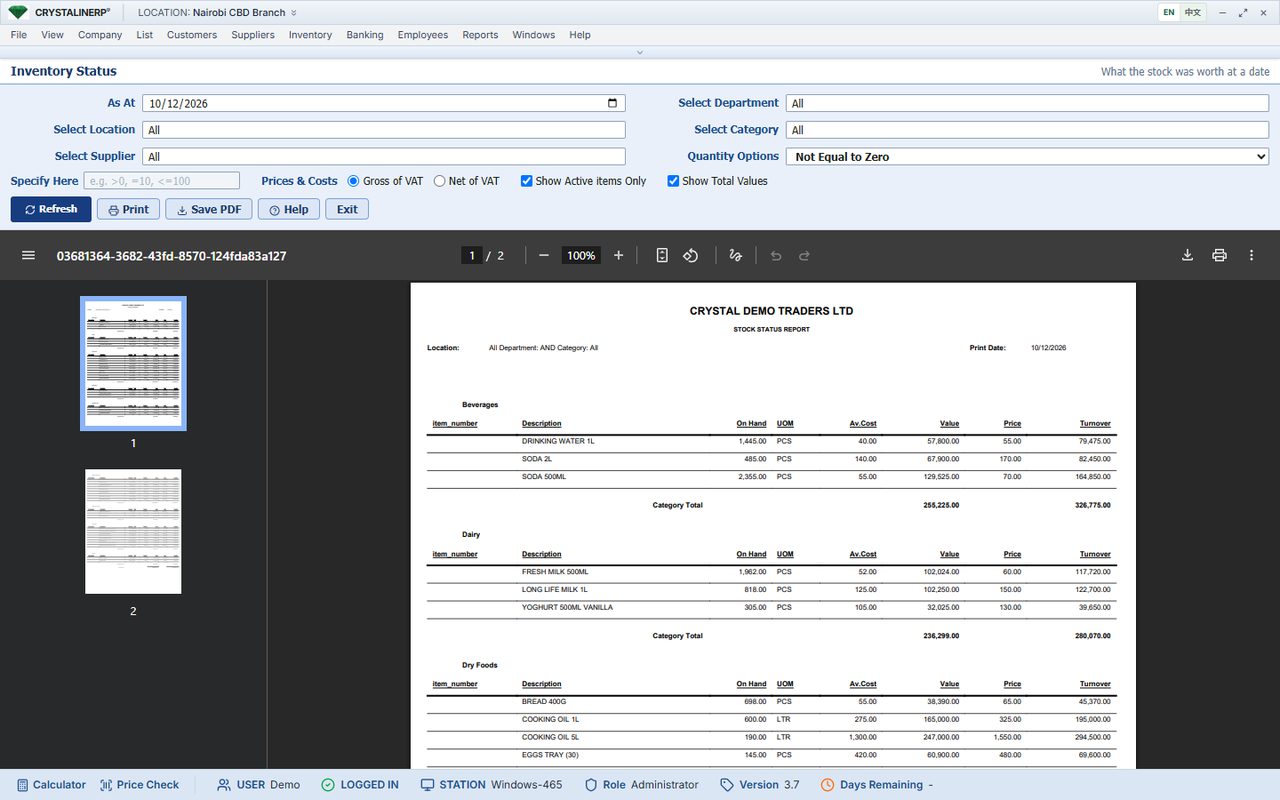
  • Stock status and valuation at any date, per location, department or supplier
  • Stock movement audit trail per item; item history with purchases and sales
  • Assemblies and kits built from components; containers and returnables
Inventory status report showing stock quantities and values per item on a chosen date View full screen
Inventory Status: what the stock was worth on a date.

Available now

Receive goods and keep suppliers in order.

Follow a purchase from order to receipt, supplier invoice and payment. Each step updates stock and the supplier account.

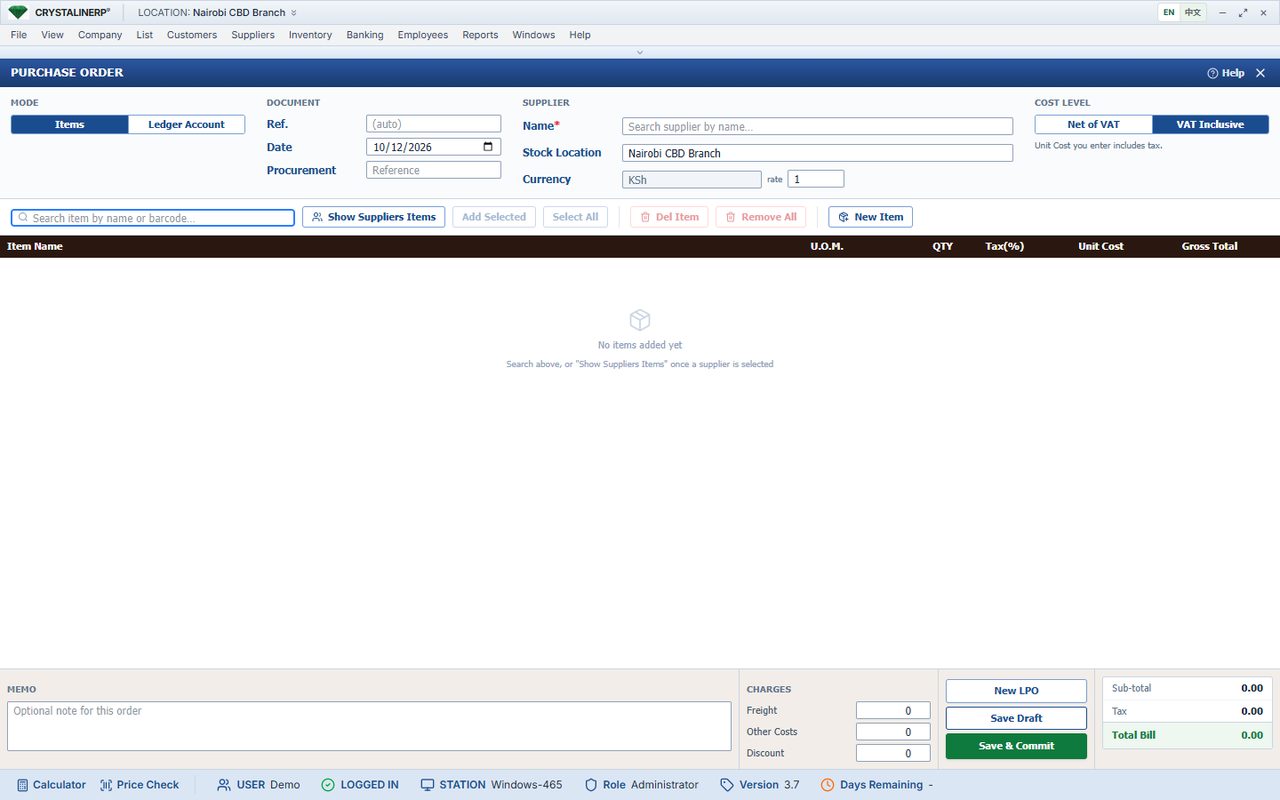
  • Purchase orders; receive and bill, or receive now and bill later
  • Supplier invoices, cash purchases, purchase returns and cost credit notes
  • Supplier payments, refunds and allocations; withholding VAT; imports declaration
More purchasing features
  • Supplier statements and reports; supplier item codes for KRA purchase matching
New purchase order screen with supplier, item search and order lines View full screen

Available now

Keep customer credit under control.

Set credit limits and payment terms, allocate receipts to invoices and see overdue balances clearly.

  • Customer accounts, credit limits enforced at the till, payment terms
  • Invoices, credit notes, payments with allocation, cheques register
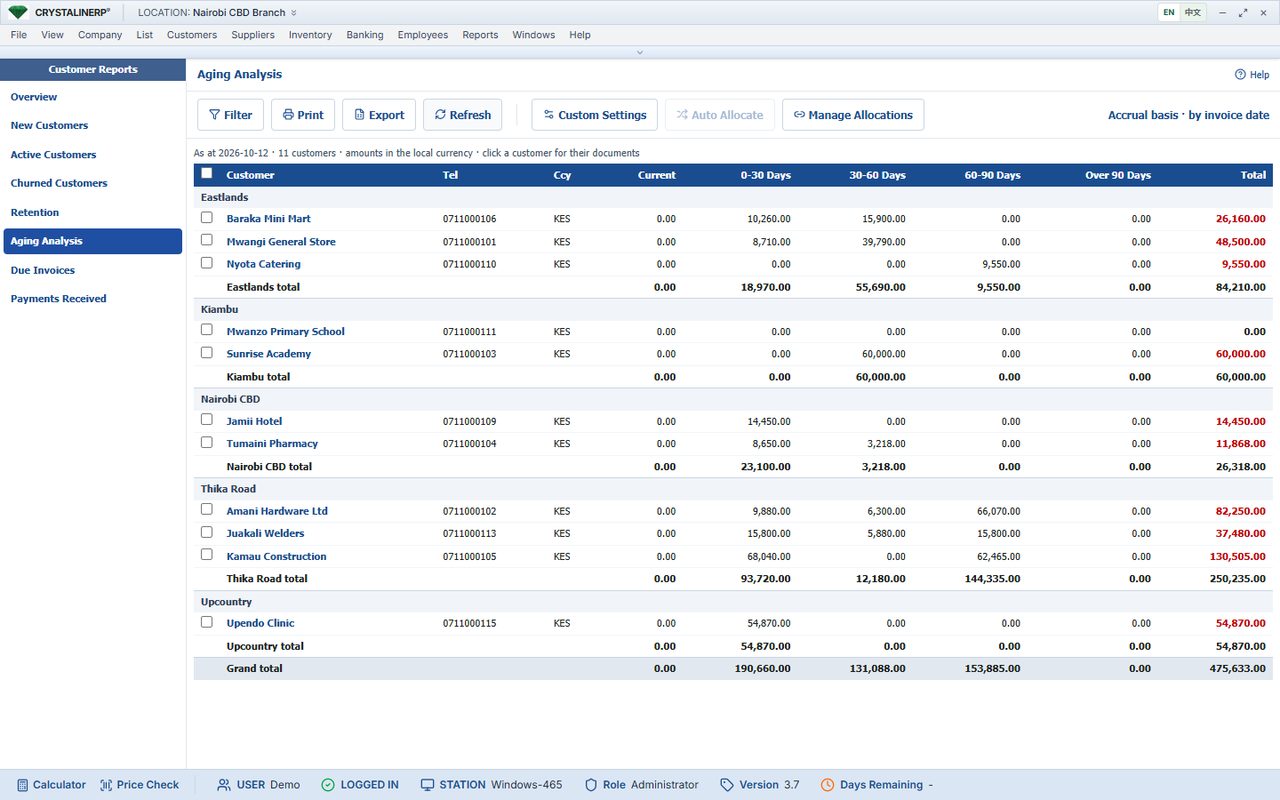
  • Aging analysis, due invoices, customer balances, printed and emailed statements
More customer credit features
  • Loyalty cards and points, layaway, vouchers, quotations and delivery notes
Customer aging analysis with balances split into current, 30, 60 and 90-day buckets View full screen

Available now

Turn daily trading into usable accounts.

Sales, stock costs, customer balances and supplier balances post as documents are entered. Add journals, banking and reconciliation in the same system.

  • Chart of accounts and account centre with drill-down to documents
  • Journal entries; deposits, withdrawals and transfers between accounts
  • Bank reconciliation wizard; cashier reconciliation per till
More accounts features
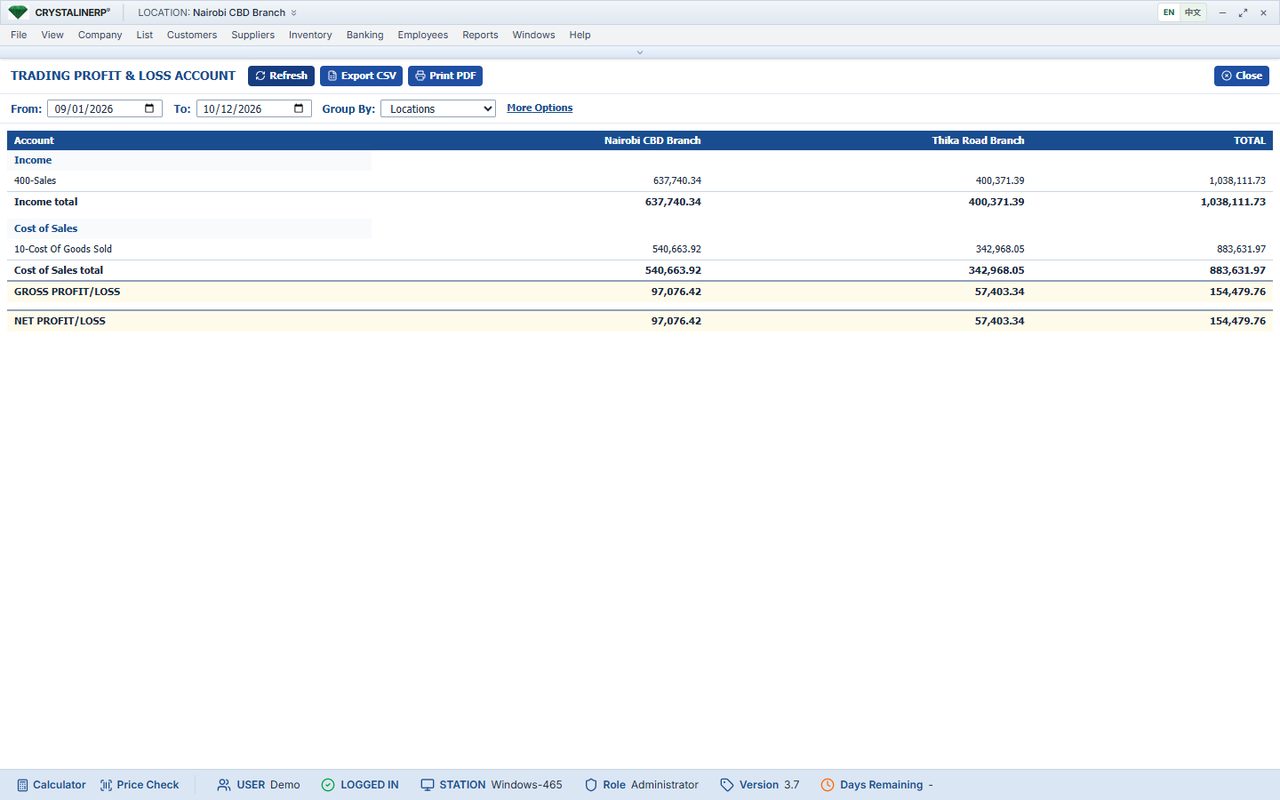
  • Trading profit and loss, grouped by location or month; budgets; fixed assets and depreciation
  • Requisitions and petty cash; payroll and attendance for businesses that need them
Trading profit and loss account grouped by branch View full screen

Available now

See the numbers behind the day.

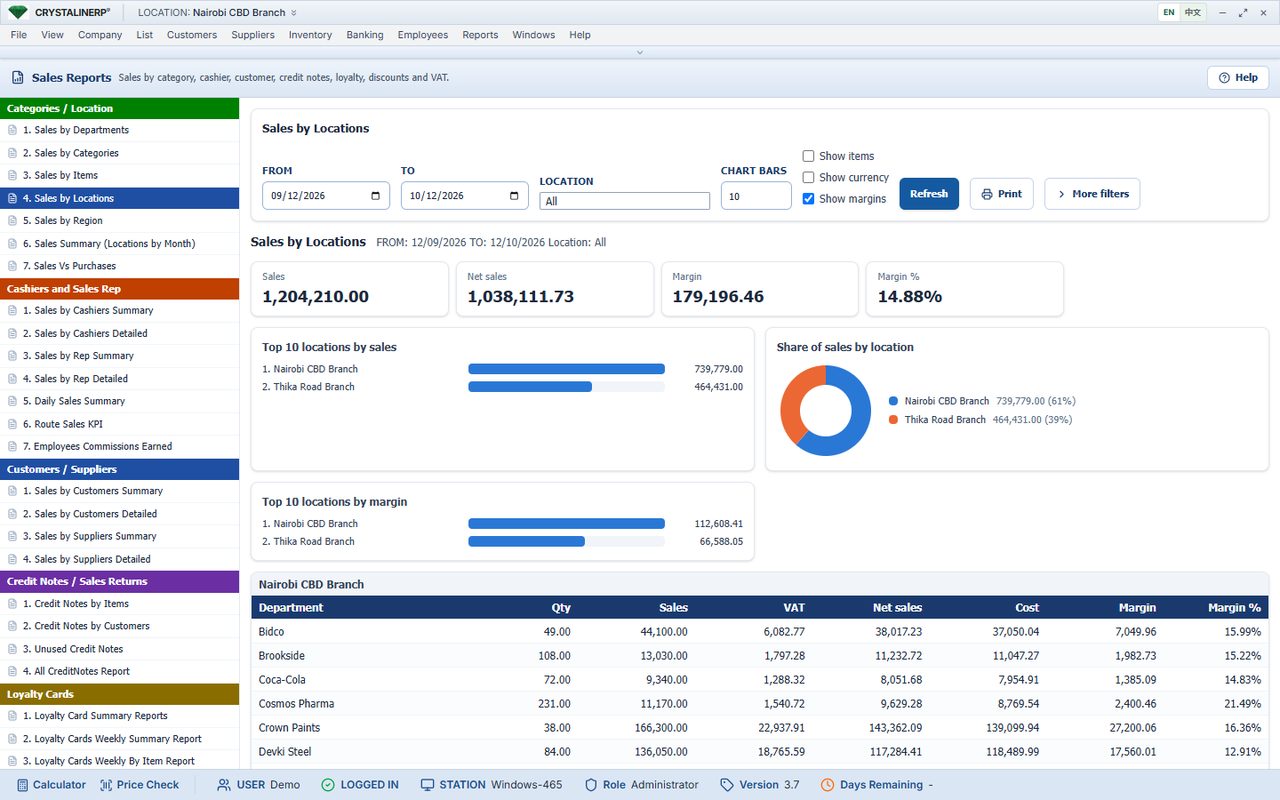
Review sales, cash, stock and customer balances by date or location. Export reports to Excel, CSV or PDF.

  • Sales by department, category, item, location, region, month, cashier, rep and customer
  • Cashier dashboard: net sales, cash in and out, variance, payment methods, customers served
  • Customer dashboard: new, active and churned customers, top balances, aging
More reports features
  • Inventory, supplier, financial and daily reports; scheduled report emails
Sales by location report comparing branches for a date range View full screen

Available now

One view across your locations.

Review branch stock, transfers, sales and profit from head office. Each branch team works with its own access rights.

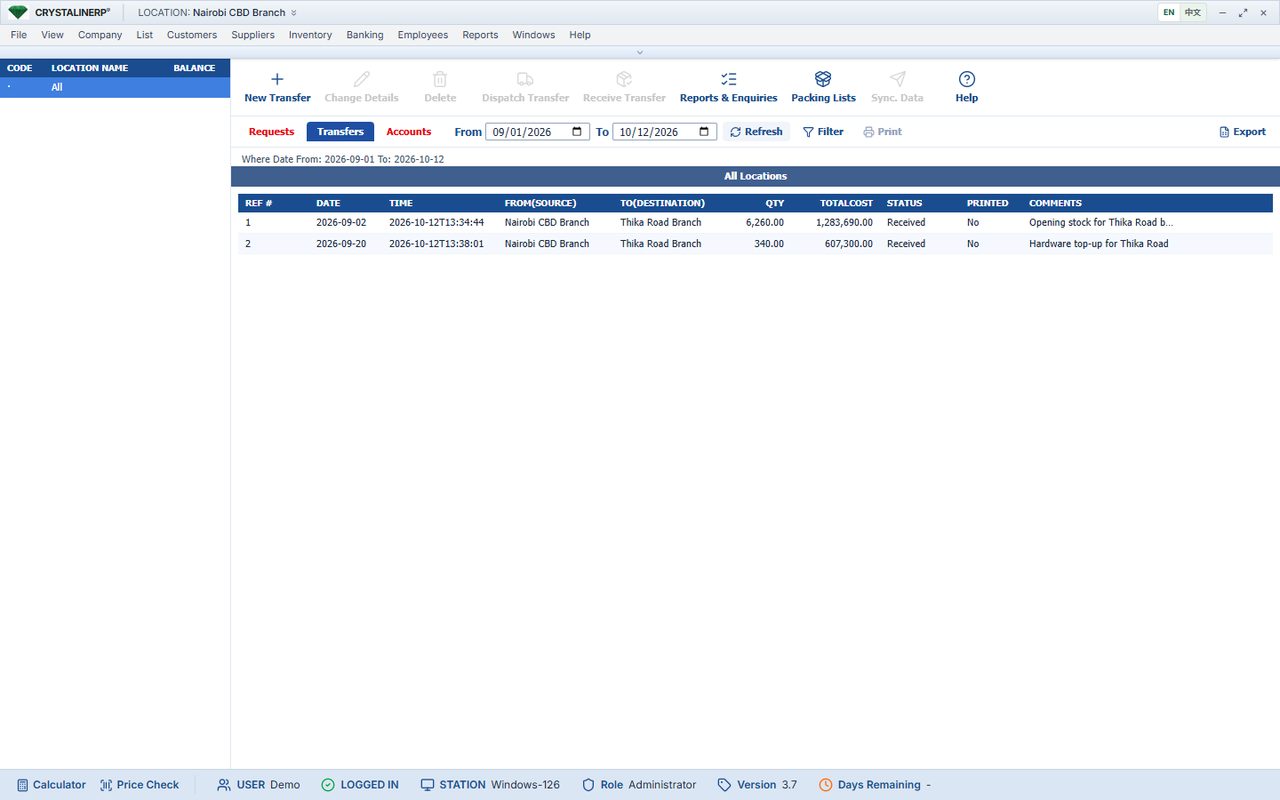
  • Stock per branch; transfer requests, dispatch and receipt with packing lists
  • Reports per branch or consolidated; profit and loss with a column per branch
  • Branch servers on a VPN or hosted together; a head-office report feed for remote branches
More on multi-branch →
Stock transfers screen listing transfers between branches with status View full screen

Available now

Give staff access. Keep accountability.

Set permissions by role, require supervisor authorisation for sensitive actions and review who changed a record.

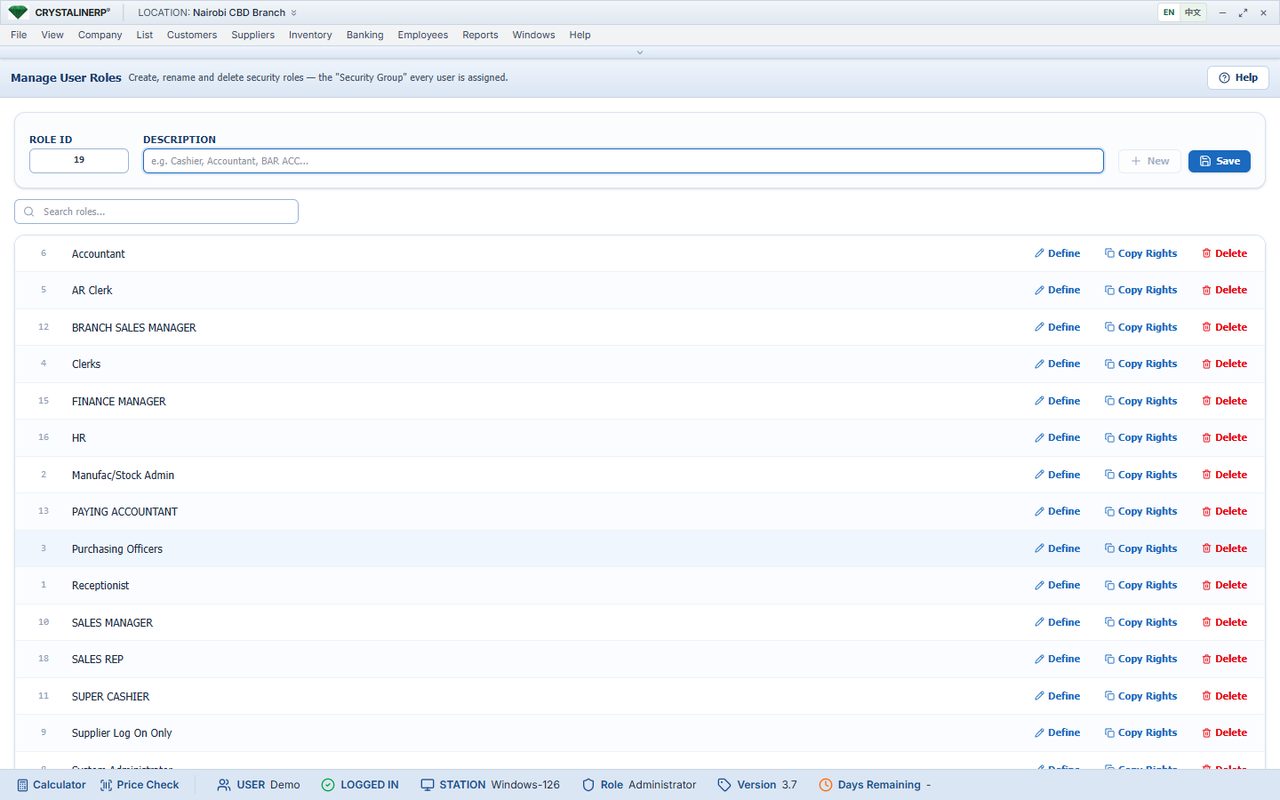
  • Security roles with several hundred individual rights
  • Audit trail of creates, edits and deletes with before and after values
  • Registered tills; user limits on bills and amounts; supervisor authorisations
Security roles screen where rights are granted to a role View full screen

Integrations and platform

Set up during onboarding

M-Pesa

Received M-Pesa payments are matched to sales and customer payments and reconciled. STK push from the till works through a supported provider (including bank express services). Configured per business; needs your paybill or till and the provider's account.

Set up during onboarding

KRA eTIMS

Sales are signed through an OSCU or VSCU provider from the eTIMS Center (code lists, item registration, purchases from KRA), or through a fiscal device. Scope and provider are confirmed for your business during setup.

Set up during onboarding

SMS and email

Customer statements by email on a schedule from your own mailbox; scheduled report emails to owners; SMS notifications through an SMS gateway account.

Available now

Runs where you need it

Windows server on site with MySQL; tills in any browser or in the Crystaline desktop till app; Android app for phones and handhelds; or a hosted account reached over HTTPS.

Available now

Updates and backups

Servers update themselves overnight to the release we have tested. On-site servers can take a nightly compressed backup of every database and keep seven daily and four weekly copies.

Available now

Import and export

Items, customers and suppliers imported from xlsx or csv with a preview; every list and report exports to CSV, Excel or PDF. The database is yours.

Capabilities marked "Set up during onboarding" exist in the product but depend on third-party accounts, devices or registrations that are set up with you.

See your business in the demo.

Walk through sales, stock, debtors and branch reports with our team. About 30 minutes, with your questions answered as we go.

WhatsApp